Contact
Online help of Tune4Mac Audio Converter
Tune4Mac M4P Converter Music files Converter easily converts your copy-protected music and audio book files(WMA,M4P,AA and M4B formats) to unprotected audio files(MP3 or AAC format). Then you can share these unprotected audio files on any computers or music devices. Fully automatic, Tune4Mac M4P Converter frees you from the hassles of copy protection without defeating the DRM copy-protection technology used by your audio files. This means it will function with all copy-protection measures, and it's completely legal. The followings are something you need to know before you use it.
Running Tune4Mac M4P Converter
After you install Tune4Mac M4P Converter in your computer, open Applications folder in Finder. Double-click the icon of Tune4Mac will run Tune4Mac M4P Converter Application.
Burning Music Files in iTunes 7
1. Run Tune4Mac M4P Converter application, click Setting button to set output
folder and some parameter related to mp3 format.
2. Run iTunes, choose iTunes -> Preferences menu.

3. On Preferences dialogbox of iTunes, click Advanced -> Burning,
Select Tune4Mac Virtual CD-RW as the burner and Audio CD as the
Disc Format. Then click OK to return to the main screen of iTunes.
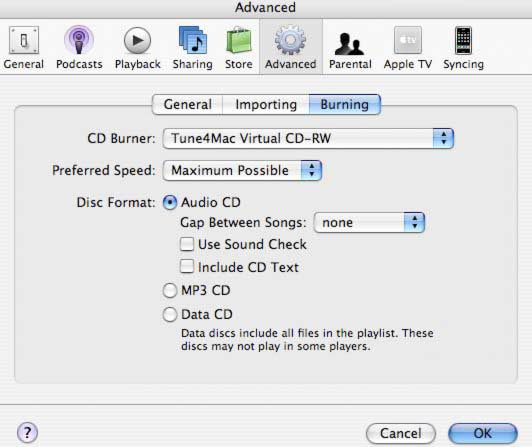
4. On iTunes menu, click File -> New Playlist to create a new playlist.
You can also rename it like "burn list".

5. Right-click on the music in your library, then click Add to Playlist
menu item, and choose the file you want to burn. Press Shift or Ctrl to add more than
one music files to the playlist at one time.

6. Select the playlist containing the songs you want to burn, make sure
all the songs you want to burn in the virtual CD have a checkmark beside
them. Right-click on the selected playlist and choose Burn Playlist
to Disc in the pop-up menu, or just click Burn Disc button
in the lower right corner.


7. When burning is finished, In main window of Tune4Mac M4P Converter application, you could
find all converted music files are listed in the panel. Select a music file in the list, then
click Folder button to view the output files, or Click Play
to play it.

Edit ID3 Tags
1. Once Tune4Mac M4P Converter encode mp3 completed, you could double click MP3 file on
the list to edit ID3 Tags.
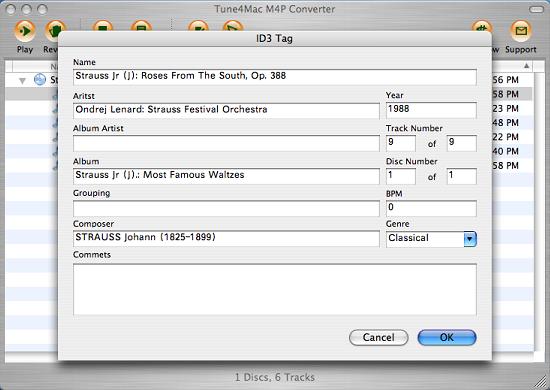
2. Click OK to save ID3 tags to MP3 file.
Hot Mac Products
Knowledge Center
About Us | Sitemap | Contact | Resources | Privacy | Terms & Conditions | Legal Disclaimer
Apple logo® and iTunes Logo® are trademarks of Apple In.