How to Install Tune4mac on Mac Mountain Lion & Mavericks
Description
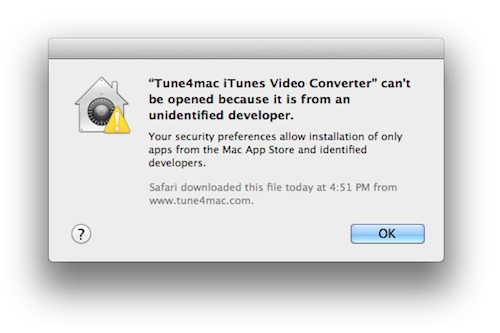
When installing Tune4mac on Mac Mountain Lion & Mavericks, you may get the aforementioned error dialog saying that "Tune4mac can’t be opened because it is from an unidentified developer", just as it shows below:
Solution
This is because Mac OS X 10.8 & 10.9 includes new features to improve security for users. One of the new default options prevents users from being able to install or launch applications that are not downloaded from the Mac App Store, or that have not been digitally signed by the developers.
To install Tune4mac software on Mac Mountain Lion & Mavericks, you should follow the steps below:


• Go to System Preferences > Security & Privacy
• Click the lock icon in the lower-left corner and enter your administrator username and password
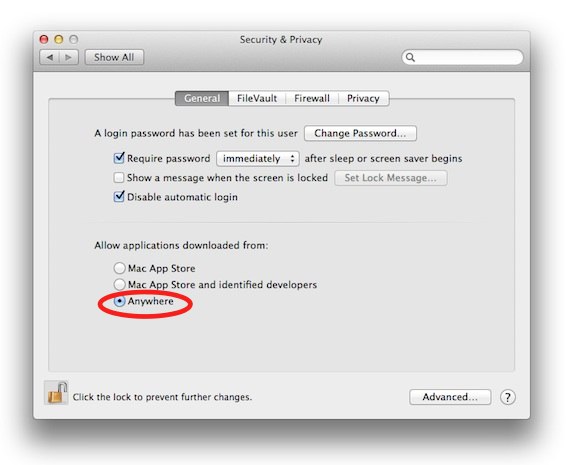
• Under "Allow applications downloaded from", select "Anywhere"
You may also refer to the screenshot as below:
After that, you can launch and run Tune4mac on your Mac OS X 10.8 & 10.9 normally.
Note: You can change the security setting back to “Mac App Store and identified developers” or “Mac App Store” as desired, for improved security.


Related articles:
 4 Tips to hlep you choose good DRM M4V removal software
Is it possible to put iTunes media files on Google Nexus 7 and Android tablet?
Hot Products


We Promise